The Tiger Leapt
There is a Steven Wright quote which I’ve lived very keenly in the last couple of weeks:
“Experience is something you don’t get until just after you need it.”
On paper I should have a great deal of experience as I’ve been in IT for over twenty years in similar roles. Maybe, I am using this experience subconsciously everyday. I read an anecdote Colin Wilson recounted in one of his books, ‘The Occult’, of a hunter in India named Jim Corbett who always walked the same path home through the jungle. One day, he absent-mindedly crossed to the other side of the path by a culvert, then recrossed just after. Later, he discovered tiger pugs (footprints) near the side of the path where he’d crossed. Wilson put this down to the man’s subconscious somehow taking in signs of said tiger and nudging him to the other side of the track.
However, I can only consciously remember once where experience helped me. That’s adding a firewall pair with the same arbitrary HA (High Availability) group in its configuration to a network. This will generate a virtual mac address with a value derived from said group for the firewall’s VRRP address(es). No big deal, but if you already have a firewall pair with that same HA group on the network, they’ll already be using that virtual mac address and chaos ensures. The first time, I learnt this was deploying a Checkpoint pair in the early 2000s, the next time was probably twelve years later on a pair of FortiGates. The distance in time was such that it took a little while to work out so we’ll count it as paw strike rather than a mauling. Then, I came to deploy a Forti pair on a network with another Forti pair and thought, ‘hey check that value’ – and I did. The value was the same as I’d deployed the other pair on the network and was more or less using a cloned config… but I changed it: Tiger avoided. It probably is using when templates or cookie cutter configs where you’d hit this, as the value generally runs from 1-255 so you’d think the odds would work in your favour in choosing a different value.
My latest gotcha was in theory avoidable – if I’d read the new hardware specs thoroughly for the new units (Cisco 4215s) – but more on this later. In my defence, I was busy dodging other mines – we’re replacing a firewall which uses a chassis manager so we have a FCM in the network. Shouldn’t that be FMC? No, it’s a Firepower Chassis Manager not an FMC Firewall Management Center. OK, for various reasons, it’s going to be difficult to deploy an FMC to manage the new firewall, so we’ll use FDM (Firewall Device Manager). This is a slightly less able management solution so let’s do a feature comparison – yes, we have all we need. (Thank you, Cisco GVE) OK, now we can’t migrate the config using Cisco’s migration tool as that only supports output for an FMC, so we’ll have to develop our own API scripts…(loyal readers will recall mention of this is in the last post). OK, this model doesn’t even have an onboard mgmt port which I’ll need for the build – so we’ll need to bring our own 1G transceiver… that wasn’t on the BOM but I can get hold of one.
Let’s do a site survey to check we can move cables from one set of firewalls to another and that we have spare power and jumper leads. Let’s ask the client to reserve a room we can work in when the firewalls are delivered so we can upgrade, license, and run out API scripts are get everything prepared.
Turning up at site, the client has done exactly as requested so let’s plug our firewall in and crack on… and , dear reader, the tiger leapt!
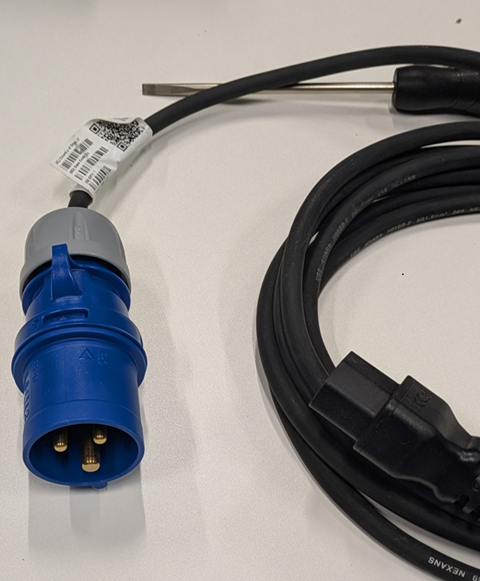
This firewall uses a 16A supply. I’ve worked on a lot of firewalls but they’ve all used 13A supplies and jump leads. No excuses, I should have known this. Anyhow, I guess I’ll avoid this tiger next time…
Incidentally, the client was very gracious about it.